Invite a friend
Two taps, whichever phone they have.
Trivit is in testing on both stores. Pick the one that matches their phone.
- Install TestFlight from the App Store.
- Open the invite link, then tap Accept.
- Enjoy.
- Join the testers. It will say “YOU DON’T HAVE PERMISSION TO ACCESS THIS CONTENT” See example. Follow arrow. Press Join group.
- Open the invite link in Google Play and tap Become a tester. It should then say You are a tester.
- Install from Google Play. It can take a few minutes to appear.
- Enjoy.
Play shows a standard line about collecting data. The game keeps everything on your phone; only Friends, if you use it, keeps a little on a server. The privacy policy says exactly what.
Joining on Android
Google shows testers a page that looks like a wall. It is not. Here is the one thing to tap.
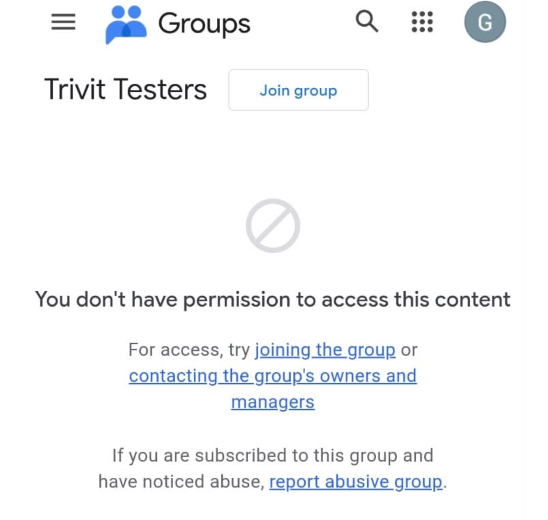
- Tap “Join group” at the top of the page. It sits above the message, so it is easy to scroll past.
- The page will say you do not have permission. That is normal before you join, and it is not a rejection.
- Once you have joined, come back here and open the Play Store link.
Use the same Google account that is signed in on your Android phone, or the Play Store will not see you as a tester.
On a computer? Scan the codes with the phone you want it on. These install on a phone and nowhere else, so a link opened here has nowhere to go.
Google asks testers to stay installed for fourteen days, which is the only thing either store really needs from anyone.